
Like Domain Authority of Google, Baidu also has an indicator to quantify the performance and potential of a website. And just as Domain Authority is not recognized by Google officially, Baidu Weight is just a 3rd party indicator by Chinaz.com and Aizhan.com.
How to get the Baidu Weight of a website?
Typically you can just visit Chinaz and Aizhan, type in the website you want to evaluate and click enter. For example, check the following screenshots and you will see Baidu weight of Google on Chinaz and Aizhan. Interestingly, both desktop and mobile ends have one.
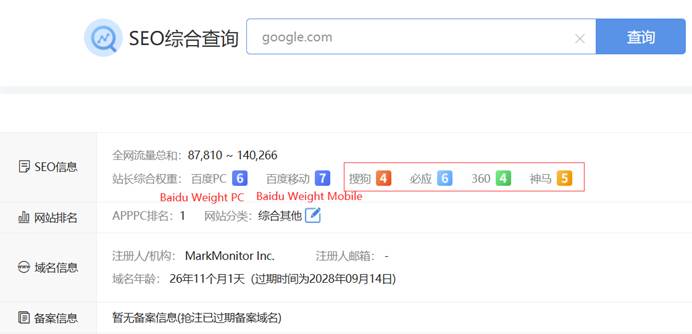
Google’s value on Chinaz
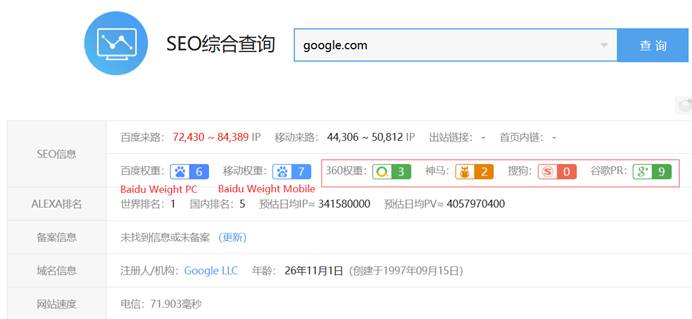
Google’s value on Aizhan
In the case of Google, Baidu weights are equal on Chinaz and Aizhan. However, for many other cases, they are not the same. In this kind of situation, we recommend to go with the lower one. Better to consider your website to be less-performing. Eventually, it motivates you to improve much.
What’s the benchmark?
Baidu weight varies from 0 to 9 which 9 means the highest. Only large portals in China with massive pages and huge traffic source could reach it.
It’s also the indicator of a website’s overall performance on Baidu. It takes keyword rankings, organic traffic estimation, user experience and other important factors into account.
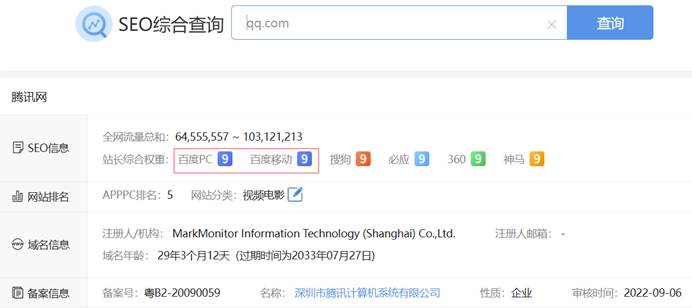
qq.com(under Tencent group) has 9
For almost all new websites, their Baidu weight is 0. If properly managed, it could grow to 1 in several months and reach 2 in a year. But if you want to take it to the next level, it requires many more resources.
For most business websites, the Baidu weight of 1 is enough to compete and 2 would be a plus. However, if the business is very competitive, let’s just say even 4 might not be good enough.
How to grow Baidu weight of a website?
It’s not a difficult thing. It just needs proper planning and day-to-day work on Baidu SEO. Build more pages, build more backlinks, optimize user experience and keep doing all these.
If you desire to know more about our Baidu SEO services, please connect with us via service@baiduseopro.com